 Contents → Special pages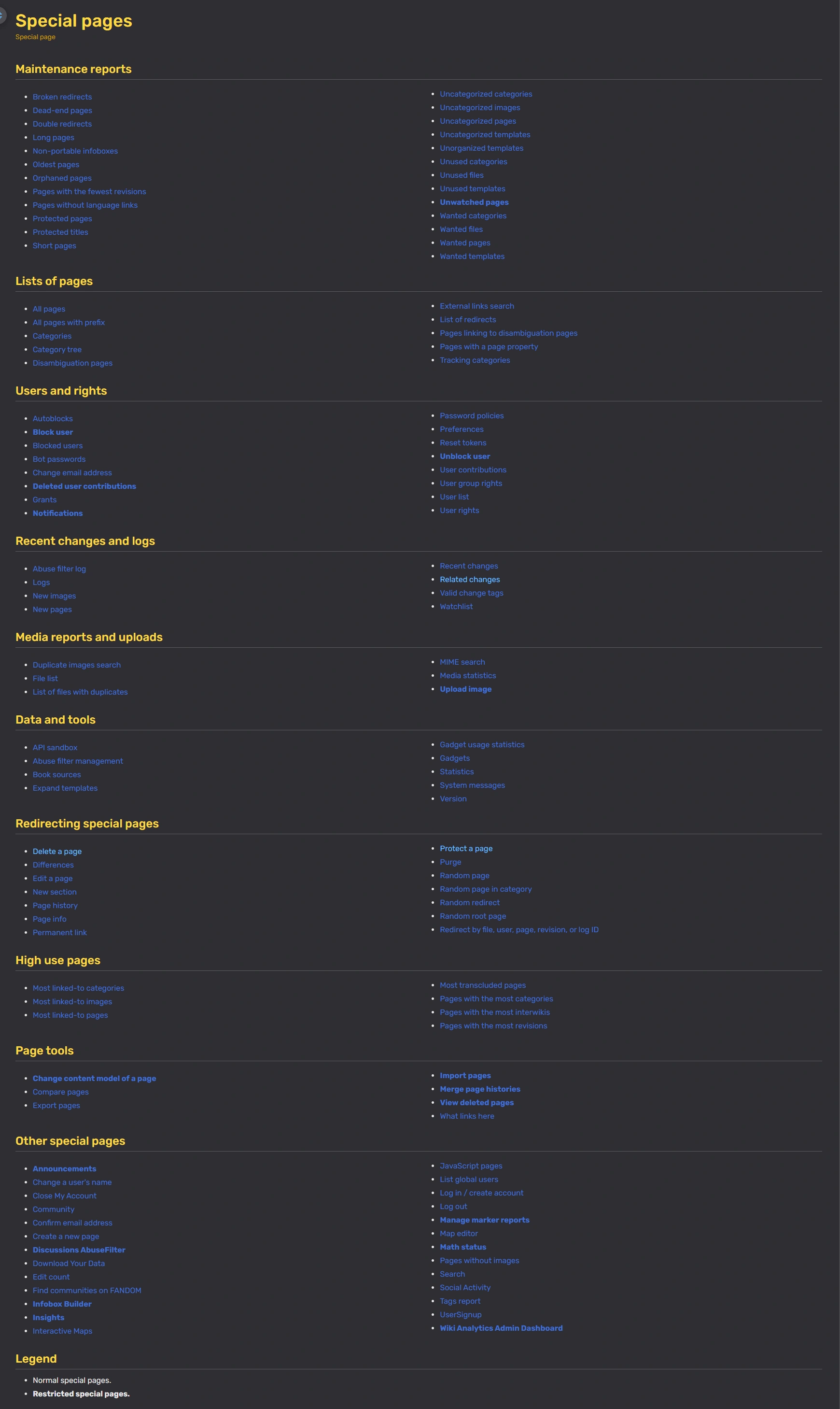

The Special Pages page
Special pages are tools and reports that come with the MediaWiki software and help with wiki management. Special pages always begin with the prefix "Special:".
How to find special pages?
- You can see a list of special pages available by visiting Special:SpecialPages. You can also access this page using the keyboard shortcut Alt + Shift + Q.
- If you're an admin on Memory Alpha, you can find this in the Admin Dashboard under the "Advanced" Tab.
- If you want to create a shortcut to this list, you can add it to your toolbar by clicking "Customize" and adding "Special pages" to your list.
List of special pages
Below is a list of options in Special:SpecialPages, color and letter coded by access levels:
- Default color (no letter) – Available to anyone
- Green (L) – Available to logged in users
- Red (A) – Available to admins
If a special page isn't available to an user, it will generally not display on their view of Special:SpecialPages.
Maintenance reports
- Broken redirects
- Special:BrokenRedirects – List of pages whose target page has been deleted or doesn't exist. (Redirects)
- Dead-end pages
- Special:DeadendPages – Pages without any outgoing links.
- Double redirects
- Special:DoubleRedirects – List of pages that redirect to another redirect page. (Redirects)
- Long pages
- Special:LongPages – Pages that contain the most characters in descending order.
- Non-portable infoboxes
- Special:NonportableInfoboxes – Templates that are marked as infoboxes but do not use portable infobox markup. (Infoboxs)
- Oldest pages
- Special:AncientPages – Lists the oldest pages on Memory Alpha.
- Orphaned pages
- Special:LonelyPages – Pages not linked to or from any other page on Memory Alpha.
- Pages with the fewest revisions
- Special:FewestRevisions – Pages with the least amount of edits.
- Pages without language links
- Special:WithoutInterwiki – Pages that do not link to any alternate language counterparts. (Help:Interlanguage links)
- Protected pages
- Special:ProtectedPages – List pages that cannot be edited by non-admins or non-autoconfirmed users. (Protect a page)
- Protected titles
- Special:ProtectedTitles – Pages that have been protected from creation from non-admins. (Protect a page)
- Short pages
- Special:ShortPages – Pages that contain the fewest characters in ascending order.
- Uncategorized categories
- Special:UncategorizedCategories – Categories without category tags. (Categories)
- Uncategorized files
- Special:UncategorizedFiles – Images without category tags. (Categories)
- Uncategorized pages
- Special:UncategorizedPages – Pages without category tags. (Categories)
- Uncategorized templates
- Special:UncategorizedTemplates – Templates without category tags. (Categories)
- Unorganized templates
- Special:UnorganizedTemplates – Templates without any type definitions. (Template types)
- Unused categories
- Special:UnusedCategories – Displays categories that have not been used.
- Unused files
- Special:UnusedFiles – Images that do not appear on any page. (Help:Adding images)
- Unused templates
- Special:UnusedTemplates – Templates that are not included in any page. (Templates)
- Unwatched pages (A)
- Special:UnwatchedPages – Pages that are not on any user's watchlist.
- Wanted categories
- Special:WantedCategories – Pages that use a category that has not been created yet. (Categories)
- Wanted files
- Special:WantedFiles – Most internally linked-to files (not just images) that do not yet exist.
- Wanted pages
- Special:WantedPages – Most internally linked-to articles that do not yet exist.
- Wanted templates
- Special:WantedTemplates – Most internally linked-to templates that do not yet exist.
Lists of pages
- All pages
- Special:AllPages – A list of every page on Memory Alpha.
- All pages with prefix
- Special:PrefixIndex – Displays all namespaces within Memory Alpha, along with a search box.
- Categories
- Special:Categories – List of categories. (Categories)
- Category tree
- Special:CategoryTree – Use a category name to see its contents as a tree structure. (Categories)
- Disambiguation pages
- Special:DisambiguationPages – List pages marked as disambiguations. (Help:Glossary#D)
- External links search
- Special:LinkSearch – Links on pages that take readers outside of Memory Alpha. (Searching)
- List of redirects
- Special:ListRedirects – List of redirects on Memory Alpha. (Redirects)
- Pages linking to disambiguation pages
- Special:DisambiguationPageLinks – List of pages that are linking to the disambiguation page by
__DISAMBIG__magic word. (Help:Glossary#D) - Pages with a page property
- Special:PagesWithProp – Pages that are using properties.
- Tracking categories
- Special:TrackingCategories – Lists to the maintenance categories.
Users and rights
- Autoblocks
- Special:AutoblockList – Lists the autoblocked users. (Bans and blocks)
- Block user (A)
- Special:Block – Block a user or IP address. (Bans and blocks)
- Blocked users
- Special:BlockList – Blocked IPs and usernames. (Bans and blocks)
- Bot passwords
- Special:BotPasswords – Registers user's bot account. (Bots)
- Change email address
- Special:ChangeEmail – Change the email address associated with your account. (Also within Special:Preferences)
- Deleted user contributions (A)
- Special:DeletedContributions – View a user's or IP address's edits that have been deleted. (Delete)
- Grants
- Special:ListGrants – Lists the grants.
- Notifications (L)
- Special:Notifications – Lists Gamepedia notifications. (Notifications)
- Password policies
- Special:PasswordPolicies – Lists the password policies.
- Preferences
- Special:Preferences – Change your user preferences. (Preferences)
- Reset tokens
- Special:ResetTokens – Resets the tokens from watchlist. (Watchlist)
- Unblock user (A)
- Special:Unblock – Unblock a user or IP address.
- User group rights
- Special:ListGroupRights – List of rights associated with each user group. (Help:User rights)
- User list
- Special:ListUsers – List of people who have edited Memory Alpha. You can also narrow it down to view specific user groups with a specific edit to "Users". This tool also has some aliases that will immediately narrow down the scope of the page. (Help:ListUsers)
- Special:ListAdmins – Only sysops are returned by default.
- Special:ListBots – Only bots are returned by default.
- User contributions
- Special:Contributions – List of contributions of anonymous or logged-in users. (Help:User contributions)
- User rights (A)
- Special:UserRights – Use to manage user rights of users. (Help:User rights)
Recent changes and logs
- Abuse filter log
- Special:AbuseLog – Logs of abuse filters by AbuseFilter.
- New files
- Special:NewFiles – List of new images on Memory Alpha. (Adding images)
- Logs (extended list)
- Special:Log – Logs of deletion, protection, blocking, image uploads and user rights settings.
- New pages
- Special:NewPages – List of new pages on Memory Alpha. (New page)
- Recent changes
- Special:RecentChanges – The latest edits on Memory Alpha. (Recent changes)
- Related changes
- Special:RecentChangesLinked – Changes made recently to pages linked from a specified page or to members of a specified category.
- Valid change tags
- Special:Tags – A list of the tags that MediaWiki may mark an edit with, and their meaning.
- Watchlist
- Special:Watchlist – A recent changes list of all edits to pages you're following.
- Special:EditWatchlist – Edit your list of watched pages. (Watchlist)
- Special:EditWatchlist/raw
Media reports and uploads
- File list
- Special:ListFiles – List of files uploaded that can be sorted by size or date.
- List of files with duplicates
- Special:ListDuplicatedFiles – Lists the duplicated files.
- MIME search
- Special:MIMESearch – Enables the filtering of files for its MIME-type.
- Media statistics
- Special:MediaStatistics – Lists the media statistics.
- Search for duplicate files
- Special:FileDuplicateSearch – Locate duplicate files based on filename.
- Upload file (L)
- Special:Upload – Upload a file to Memory Alpha.
Data and tools
- API sandbox
- Special:ApiSandbox – Opens the API sandbox for queries.
- Abuse filter management
- Special:AbuseFilter – Opens the main page of AbuseFilter.
- Book sources
- Special:BookSources – Searches for book sources. Used when an ISBN is linked to on a page. See Manual:ISBN for more information and right syntax.
- Expand templates
- Special:ExpandTemplates – Expands a template. (Templates)
- Gadget usage statistics
- Special:GadgetUsage – Lists the usage of gadgets. (Gadgets)
- Gadgets
- Special:Gadgets – Lists the gadgets. (Gadgets)
- Statistics
- Special:Statistics – Total number of pages and users
- System messages
- Special:AllMessages – Displays all pages in the MediaWiki namespace (System messages)
- Version
- Special:Version – The version of the software Memory Alpha is currently running. Also displays installed extensions.
Redirecting special pages
- Differences
- Special:Diff – Shows differences in a page using the difference ID. (Page history)
- Edit a page
- Special:EditPage – Allows one to edit a page by entering a target page. (Editing)
- New section
- Special:NewSection – Allows one to add a new section by entering a target page. (Editing)
- Page history
- Special:PageHistory – Allows one to enter a page's history by entering a target page. (Page history)
- Page info
- Special:PageInfo – Allows one to enter a page's info by entering a target page.
- Permanent link
- Special:PermanentLink – Generates a permanent link for a given revision ID.
- Purge
- Special:Purge – Allows one to purge a page cache by entering a target page. (Purge)
- Random page
- Special:RandomPage – Redirects to a random page.
- Random page in category
- Special:RandomInCategory – Generates a random page limited to the named category.
- Random redirect
- Special:RandomRedirect – Randomly goes to a redirecting page. (Redirects)
- Random root page
- Special:RandomRootpage – Randomly redirects to a root page.
- Redirect by file, user, page, revision, or log ID
- Special:Redirect – Opens the redirect for a page, file name, user ID, revision ID, or log ID.
High use pages
- Most linked-to categories
- Special:MostLinkedCategories – Categories that have the most links to them in descending order.
- Most linked-to files
- Special:MostLinkedFiles – Files that have the most links to them in descending order.
- Most linked-to pages
- Special:MostLinkedPages – Pages that have the most links to them in descending order.
- Most transcluded pages
- Special:MostTranscludedPages – Pages that have the most transclusions to them in descending order.
- Pages with the most categories
- Special:MostCategories – List of pages with the most categories in descending order.
- Pages with the most interwikis
- Special:MostInterwikis – Pages that have the most interlanguage links. (Interlanguage links)
- Pages with the most revisions
- Special:MostRevisions – List of pages with the most number of edits in descending order.
Page tools
- Change content model of a page (A)
- Special:ChangeContentModel – Changes the content model.
- Compare pages
- Special:ComparePages – A tool to allow comparing revisions of two different pages.
- Export pages
- Special:Export – Exports the source of individual wiki pages, optionally with their histories, in a thin XML wrapper which includes metadata like time, etc (Help:Exporting pages)
- Import pages (A)
- Special:Import – Import pages exported from another wiki in an XML file (Help:Exporting pages)
- Merge page histories (A)
- Special:MergeHistory – Merges the histories of two pages.
- View deleted pages (A)
- Special:Undelete – One way to undelete a page or review deleted revisions of pages.
- What links here
- Special:WhatLinksHere – Finds all pages that link to an article. Three filters are available to except links, redirects, or transclusions from the results. It is not yet possible to except transcluded links.
Other special pages
- Announcements (A)
- Special:Announcements – Allows you to make an announcement. (Announcements)
- Change a user's name
- Special:UserRenameTool – User Rename service. You can only rename your account once. (Help:Changing your username)
- Close My Account
- Special:CloseMyAccount – Allows you to close your account. Accounts will be closed automatically after 30 days. (Help:Closing an account)
- Community
- Special:Community – Partially editable by admins. (Help:Community Page)
- Confirm email address
- Special:ConfirmEmail – Confirms user's email address.
- Create a new page
- Special:CreatePage – Guided process to creating new pages. (New page)
- Create New Community
- Special:CreateNewWiki – Guided process to creating a new wiki. (Help:Start a new community)[1]
- Download Your Data
- Special:DownloadYourData – Download the data we provide: username, user ID, real name (if provided), email address, account creation date and a link to a list of your contributions. (Database download)
- Edit count
- Special:EditCount – Edit tally broken down by namespaces locally and globally. (Editcount)
- Find communities on Fandom
- Special:SearchCommunity – Finds any communities on Fandom.
- Infobox Builder (L)
- Special:InfoboxBuilder–A graphical user interface for creating portable infoboxes.
- JavaScript pages
- Special:JSPages – Lists the current review status of MediaWiki namespace scripts. (Help:JavaScript review process)
- List global users
- Special:ListGlobalUsers – List of users with global user rights. Only Global Discussions Moderators, Vanguards, SOAP, Helpers, and Staff are returned by default.
- Special:ListStaff – Only staff members are returned by default.
- Special:ListSOAP – Only SOAP members are returned by default.
- Special:ListHelpers – Only helpers members are returned by default.
- Log in / create account
- Special:UserLogin – Login to your Fandom account. (Logging in)
- Log out
- Special:UserLogout – Logout to your Fandom account. (Logging in)
- Map editor
- Special:MapEditor – An editor for maps. (Help:Maps Extension)
- Math status (L)
- Special:MathStatus – Displays the browser support of the math parser. (Math markup)
- Pages without images
- Special:Withoutimages – List of pages without images on them.
- Search
- Special:Search – Search Memory Alpha. (Searching)
- Social Activity
- Special:SocialActivity – Lists recent Discussions posts. (Help:Social Activity Feed)
- Tags report
- Special:TagsReport – Allows searching for usage of templates, parser functions, and HTML-like extension tags – by name, parameter name, and parameter value.
- UserSignup
- Special:UserSignup – Create a Fandom account. (Create an account)
- Wiki Analytics Admin Dashboard (A)
- Special:Analytics – Provides analytics information for Memory Alpha. (Help:Analytics dashboard)
Unlisted special pages
These pages are not listed on Special:SpecialPages.
- Blank page
- Special:BlankPage – A blank page. Can be used by JavaScript scripts to insert a custom user interface.
- Change password
- Special:ChangePassword – Change the password associated with your user account.
- Move page
- Special:MovePage – Move a page.
- Your contributions
- Special:Mycontributions – Redirects to your contributions page.
- Your talk page
- Special:Mytalk – Redirects to your talk page.
- Your uploads
- Special:MyUploads – Redirects to Special:ListFiles with your uploads.
- Your user page
- Special:Mypage – Redirects to your user page.
- Special pages
- Special:SpecialPages – Lists all the special pages.
- Theme Designer
- Special:ThemeDesigner – Edit Memory Alpha's theme.
Logs
- Abuse Filter log – Log of changes to abuse filters.
- Block log – Lists blocks and unblocks. (Bans and blocks)
- Deletion log – Lists deleted and undeleted pages. (Delete a page)
- Import log – Lists administrative imports of pages with edit history from other wikis.
- Merge log – List of the most recent merges of one page history into another.
- Move log – List of page moves. (Moving pages)
- Page creation log – List of page creations. (New page)
- Patrol log – Log of patrolled revisions.
- Protection log – List of page protections and unprotections. (Protect a page)
- Template classification log – Lists changes to template types.
- Upload log – List of images uploaded.
- User creation log – List of newly-created accounts.
- User rights log – Lists changes to user rights. (Help:User rights)
See also
- ↑ This only shows in English Community Central.