
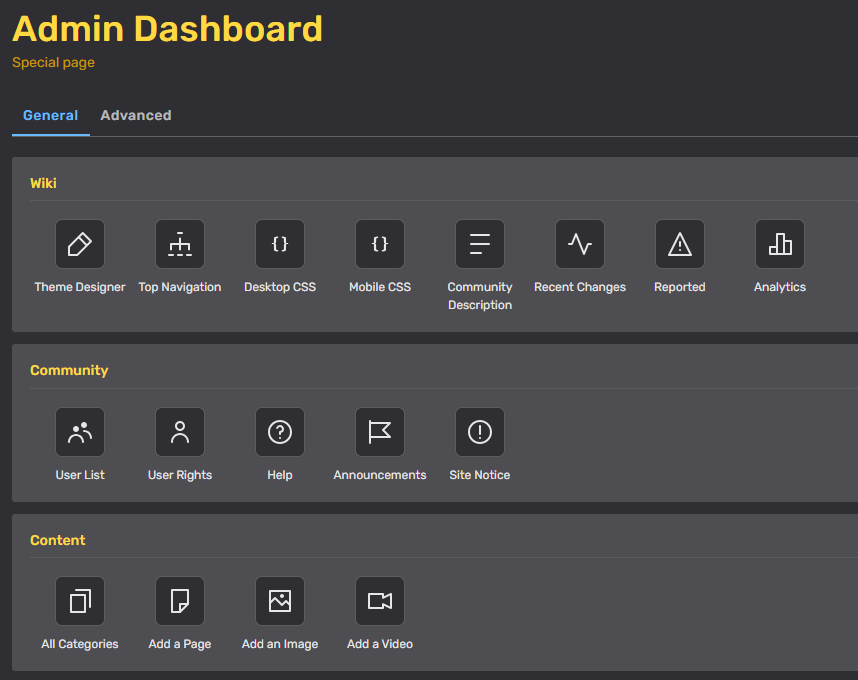

Admin Dashboard general tab
The Admin Dashboard is the go-to place for the main tools an administrator needs to run Memory Alpha. It puts the most important special pages at your fingertips.
Accessing the dashboard
The Admin Dashboard is available on all wikis you currently administer.
It can be found by clicking on "Admin" in the toolbar at the bottom of your screen, by visiting "Special:AdminDashboard", or by clicking on the dashboard icon located on the right side of Memory Alpha's top menu bar. Non-admins and non-discussions moderators who try to access the admin dashboard will get a permissions error, instead.
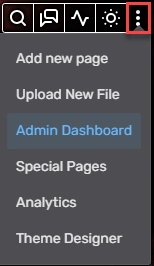

If you're an admin or discussions moderator, one easy way to find the Admin Dashboard by clicking on the icon in red
How it works
General tab
Important, often-used admin tools live on the "General" tab.
- Wiki
- Theme Designer – quickly and easily modify Memory Alpha's theme
- Recent changes – track the latest community activity
- Top Navigation – update the navigation bar
- Wiki Features – turn special features on and off
- CSS – opens a link to Desktop.css and Mobile.css so you can add advanced styling to your wiki
- Analytics – see Memory Alpha's stats
- Community
- User List – see a list of users on Memory Alpha
- User Rights – add or remove Memory Alpha users from user groups
- Announcements – change the main site-wide message on Memory Alpha
- Help – get straight to Memory Alpha's help pages
- Announcements – send a message to recently active Memory Alpha members
- Content
- All Categories – see a list of all the categories on Memory Alpha
- Add a Page and Add an Image – quickly add content to Memory Alpha
Advanced tab
The "Advanced" tab is home to the rest of the special pages, normally found on "Special:SpecialPages". (If you visit a community that you are not an admin of you will see Special:SpecialPages in a more basic format.)
Quick Stats
Quick Stats lives on the right side of the Admin Dashboard. Here you can monitor Memory Alpha's recent statistics. It shows page views, edits, and image uploads for the past seven days.
Additionally, there is a link on the bottom of the module that leads you to advanced statistics on Special: Insights, where you can find information about infobox portability and more.